

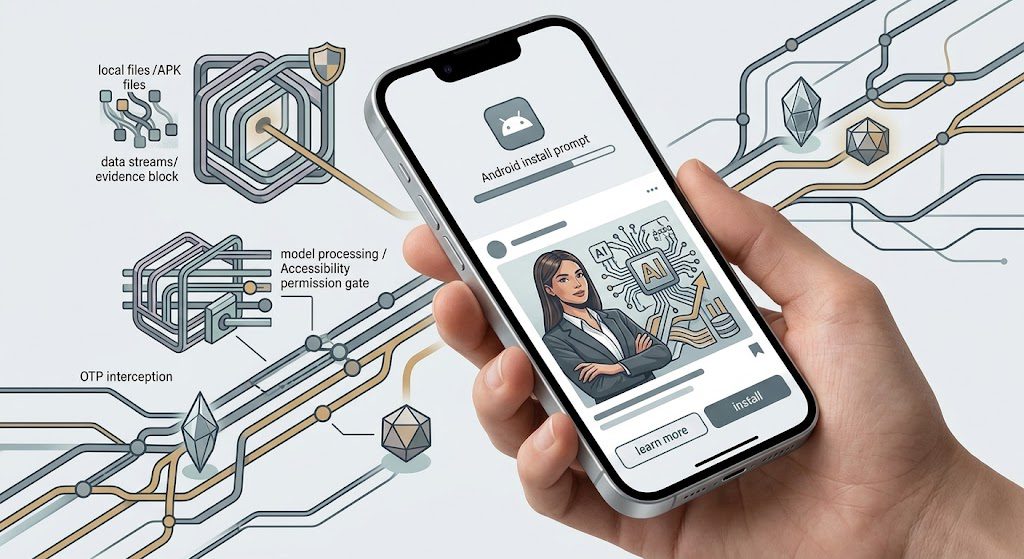
The old scam flow was easy to explain: click the fake link, enter your card details, lose money. The newer Android attack is more dangerous because the payment page may not be the real target at all.
A deceptive ad can instead push you to install an app outside the official store. Once that app receives powerful permissions, the fraudster may be able to watch what happens on your screen, read one-time passwords, imitate login screens or approve actions without you realizing what the app is doing.
The dangerous step is no longer always entering a card number on a fake page; installing a malicious Android app can hand over far more control.
Any UAE Android user who receives an ad, message or website prompt asking them to install an APK outside the Google Play Store.
UAE banks are adding device-level checks and biometric controls that can stop some malicious-app fraud before a transfer completes.
A malicious app may abuse Accessibility, overlays, SMS access or screen recording, and removal can become difficult once the device is compromised.
Banks and mobile platforms are likely to keep tightening controls around sideloaded apps, risky permissions and new-beneficiary transactions.
If you installed a suspicious APK, stop banking on that device, remove risky permissions and apps, and contact your bank through an official channel.
Fraudsters benefit when a victim grants a sideloaded app permissions that can expose OTPs, screens and banking actions.
Nobody should participate in an unsolicited install flow; legitimate banking and app updates should come through official stores or verified channels.
Watch for prompts to install APK files, enable Accessibility, allow screen overlays, disable Play Protect or move outside the official app store.
The fresh trigger for this article is not a UAE campaign. Reuters reported on August 31 that Indian authorities alerted Meta to deceptive Facebook and Instagram ads that used adult-content bait to push malicious apps. Meta removed dozens of ads after the warning. Robius is not claiming those specific ads targeted the UAE.
What makes the story relevant here is that UAE banks are already warning about the same underlying Android attack surface: sideloaded apps, risky permissions and malware that can interfere with mobile banking.
The Install Is the Handover
An APK is simply an Android application package. Installing one is not automatically malicious; companies and developers use APK files legitimately. The risk changes when a stranger, ad or unexpected message convinces you to install one from an untrusted source and then asks for permissions that have nothing to do with the app’s stated purpose.
First Abu Dhabi Bank says unsafe Android apps can read passwords and OTPs, record the screen or approve transactions without consent. FAB may block mobile-banking access on an affected device and specifically tells customers to remove unknown apps and disable risky permissions such as Accessibility.
Accessibility is the uncomfortable part because it is a legitimate Android feature designed to help users control a device. In the wrong hands, the same level of access can let an app see screens and perform actions on the user’s behalf. Most ordinary apps do not need that permission.
This is different from the familiar Dh3 parcel-text scam, where the fake payment page is the obvious trap. With malware, the dangerous permission can remain on the phone after the original ad disappears.
UAE Banks Are Already Changing the Rules
Commercial Bank of Dubai says fraudsters in the UAE are using Android malware to access customers’ phones, add new beneficiaries and make unauthorized transfers. CBD now requires biometric authentication on Android before a transfer to a new beneficiary can complete.
That control is important because it changes the fraud problem from “did the customer type the correct OTP?” to “was the customer’s device trustworthy when the transaction was approved?” A phone can authenticate successfully while a malicious app is observing or acting inside the same session.
FAB takes another approach at the device boundary. Its guidance says the bank may block mobile access when unsafe apps or risky settings are detected. Customers can still use another safe device or online banking while they clean the affected phone.
The same principle appears in our guide to the bank-impersonation call scam: an OTP is not proof that the person or process asking for it is legitimate. Device control makes that distinction even more important.
The Ad Platform Is Not the Trust Signal
A scam ad appearing inside a large platform does not make the destination safe. The Reuters case matters because the malicious path began inside mainstream social-media advertising and then tried to move the victim outside the normal app-store security boundary.
The practical rule is simple: judge the install path, not the polish of the ad. A blue tick, professional graphics, a familiar platform or a convincing landing page cannot make an unknown APK safe.
Five Permissions That Should Stop You
- Accessibility: lets an app observe screens and perform actions; most ordinary consumer apps do not need it.
- SMS access: can expose one-time passwords and transaction alerts.
- Screen recording or capture: can reveal login flows, account information and security prompts.
- Overlay or “display over other apps”: can place a fake interface over a real banking or login screen.
- Install unknown apps / disabling Play Protect: removes exactly the safeguards designed to stop risky sideloads.
And if someone who contacted you wants remote control of the phone, treat that as the same hard boundary we use in our scam-reporting impersonation investigation: nobody who calls or messages you needs to take over your device.
If You Already Installed It
Do not keep opening banking apps to “check whether everything is fine.” Use another trusted device to contact the bank through the number on its official website or card. Tell the bank you may have installed malicious software and ask what immediate account controls it recommends.
On the affected Android phone, remove unknown apps, revoke Accessibility and overlay permissions, check SMS and screen-recording access, and make sure Google Play Protect and Android security protections are enabled. FAB warns that some malware can resist removal; in that case a factory reset may be necessary, and apps should be reinstalled only from trusted sources.
The Robius Layer
The scam has moved one step deeper into the device. A fake checkout tries to steal a credential. A malicious app tries to become part of the environment where those credentials and approvals happen.
That is why the safest question is no longer only “Is this website real?” It is also “Why does this app need this permission, and why am I being asked to install it this way?” If the answer depends on urgency, secrecy or bypassing the official store, stop.
Sources
- Reuters: August 31 report on deceptive Meta ads in India that pushed malicious Android apps — https://www.reuters.com/world/meta-removes-ads-fraud-apps-posing-porn-after-india-sounds-alarm-2026-08-31/
- Commercial Bank of Dubai: UAE warning that Android malware is being used to add beneficiaries and make unauthorized transfers — https://www.cbd.ae/general/security/android-malware
- First Abu Dhabi Bank: Device-security guidance on sideloaded apps, Accessibility, OTPs, screen recording and mobile-banking blocks — https://www.bankfab.com/en-ae/personal/help-and-support/fraud-and-security/android-unsafe-apps
Robius.news — Dubai, UAE — 2026 | Built to be first. Built to be trusted.